Olitech Easy Flip Smart Review as a Minimalist Dumbphone
May 21, 2025
After using the Opel Touch Flip 4G for the past 12 months, and experiencing a few issues, including the hinge getting loose/wonky, insufficient storage space to update applications, I started to look for a better option.
The Olitech easy flip smart is a degoogled Android flip phone that has an external display. This device is also designed and certified for use in Australia and New Zealand.
Target audience
Although this device is aimed at seniors, with big buttons, hearing aid integration and an emergency button, I’m reviewing it from the perspective of a minimalist or dumbphone perspective. This includes users who want to reduce their screen time, notification anxiety and attachment to their phones whilst living in the present.
Design and accessibility
The Olitech is a flip phone from the same family as the Opel Touch Flip and Sunbeam F1 and is manufactured by Chinese manufacturer Gwin. It’s a classic flip phone design, but with an external screen and large buttons.
The external screen isn’t particularly useful as it doesn’t display notifications beyond missed calls and SMS. It is useful to see who is calling before opening the flip and seeing battery and signal status however.

Interface
The phone uses a very simple menu system/Android launcher (called GWIN) to access pre-installed applications and settings.
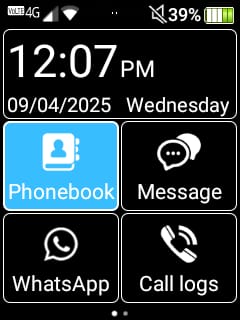
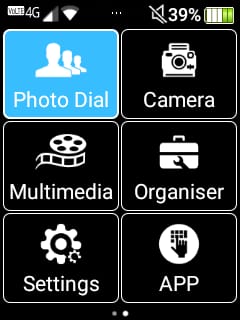
The nice addition with this device/launcher is an apps page, which means you don’t need to install additional software (such as the bar launcher) to access sideloaded applications:
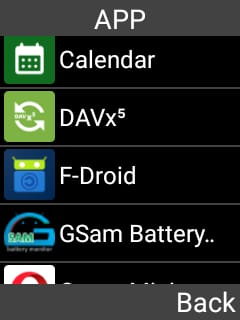
User Experience
The Olitech device is simple and easy to use. Due to the simplistic nature of the launcher or home screen, scrolling isn’t an issue, as it’s not possible to scroll multiple pages of the launcher, the way it is possible with a standard Android launcher
Key Features
- Android 8.1 (with October 2019 security patch)
- 1Gb RAM
- 1750 mAh (1-1.5 days) user-replaceable battery
- GPS – although this phone is missing Google services, including google location services. GPS, including navigation services, works fine (3rd party maps app is required)
- WhatsApp preinstalled
- Flashlight
- External screen
- 4G VoLTE for clear calls
- WiFi Calling
- USBC charging (cradle also included)
- Likely the second-generation Gwin device (with stronger vibration and a more durable hinge)
App installation
The beauty of this phone is that it’s running Android, so there are hundreds of thousands of apps you can install. As the specs of this phone are low and there is only 1 GB of memory, I’d recommend being conservative with the apps that you install. Only install critical apps that need to be used daily and aren’t huge. For me, those are:
- Fossify Calendar
- Calendar Sync (CalDavx5)
- org – Task Manager
- Opera Browser
- Organic Maps – for maps/navigation
- Trip View – Bus/Train Ferry times (real-time transport location doesn’t work due to lack of Google maps)
- TT9 – Advanced text input
- Antenna Pod – Podcast app
Apps can be easily installed via sideloading. There are a couple of methods to achieve the installation of applications:
- Download the .apk file to your computer and copy it across to the phone via USB A → USB C cable. Simply click the .apk file in the file manager app to launch the install.
- Install a third party app store (as this phone has no Google services). I use Aurora Store and fdroid to install and Android apps I need on the device.
Oddities
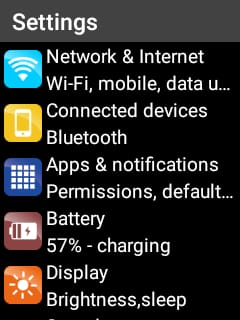
Most advanced Android settings are hidden from view and aren’t accessible from the device itself. Simple things like enabling a pin lock, I could only achieve by using an ADB command (adb shell am start -a android.settings.SETTINGS) to launch the settings menu on the phone.
TL;DR
The Olitech Easy Flip Smart is an upgraded (likely 2nd gen) variation of the Opel TouchFlip 4G which is designed and certified for AU/NZ. It has an external display, a larger battery, and double the memory of the Opel, which warrants the higher cost.
